Camsta: GPS camera for verifiable geotagged images
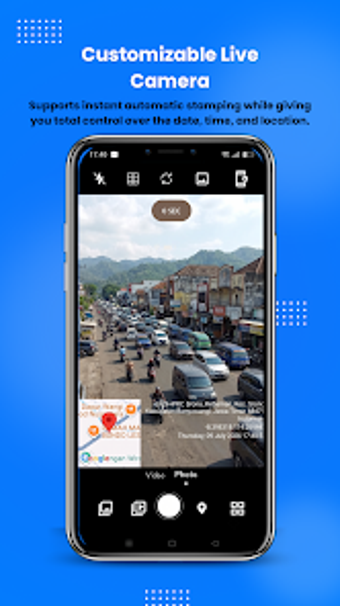
Camsta: Custom Location Camera from Appnovasi Studio targets users who need precise location and timestamp documentation for photos and videos. The app overlays GPS coordinates, addresses, and timestamps onto captured media, and lets users enter or adjust custom coordinates to correct or set locations. It includes an interactive map, customizable watermark templates, Smart Gallery sorting, and real-time address fetching, aimed at field professionals, travelers, and businesses needing verified visual records in professional settings.

Unlock your creativity with Adobe Stock
Get 10 images or 1 video with a free trial
What is Camsta used for?
Camsta functions as a GPS map camera that embeds timestamps, coordinates, and address data into photos and videos so images carry verifiable metadata. The tool supports automatic GPS timestamping and manual custom location input, giving users the option to set or correct coordinates before saving. That approach is aimed at producing documentary media intended for inspections, site logs, or travel records rather than general creative editing.
How does the Map View help you find photos?
The app provides an interactive Map View to display captured items geographically and a Smart Gallery that categorises media by location, letting users browse work visually instead of scrolling chronologically. Map entries show fetched addresses and coordinates, which helps trace site visits or group photos by project area. These organisation tools reduce time spent locating evidence across multiple shoots or project days.
Is Camsta built for professionals or casual users?
Camsta targets field professionals such as real estate agents, construction managers, and surveyors while also serving travelers who document journeys. The inclusion of professional-grade watermark templates produces outputs suitable for reports and inspections, and manual location override addresses situations with unreliable GPS. Availability on Android and regular updates indicate ongoing maintenance for mobile deployments in typical field conditions.
How does Camsta handle video recording and overlays?
The app applies live time-and-location stamps during video recording so footage contains embedded verification as it is captured. Watermark templates and real-time address fetching apply to video as well as stills, enabling a consistent appearance for documentation. Manual custom location input can be used in conjunction with live stamping to align recorded footage to a chosen coordinate or address when precise records are required.
In conclusion, Camsta suits verification-focused workflows.
Camsta is a focused, practical option for users who require verifiable, adjustable place and timestamp evidence tied to images and footage. It fits professionals who prioritise trustworthy location metadata over image-editing breadth. The trade-off is a specialised remit rather than broad creative tools, so those needing full photo manipulation should expect to pair the app with a separate editor.